
Get exam ready with Exam Mode
PlanexAI plans short prep sessions before each exam. Every card needs two Good ratings to retire, and the plan adapts as the exam gets closer.
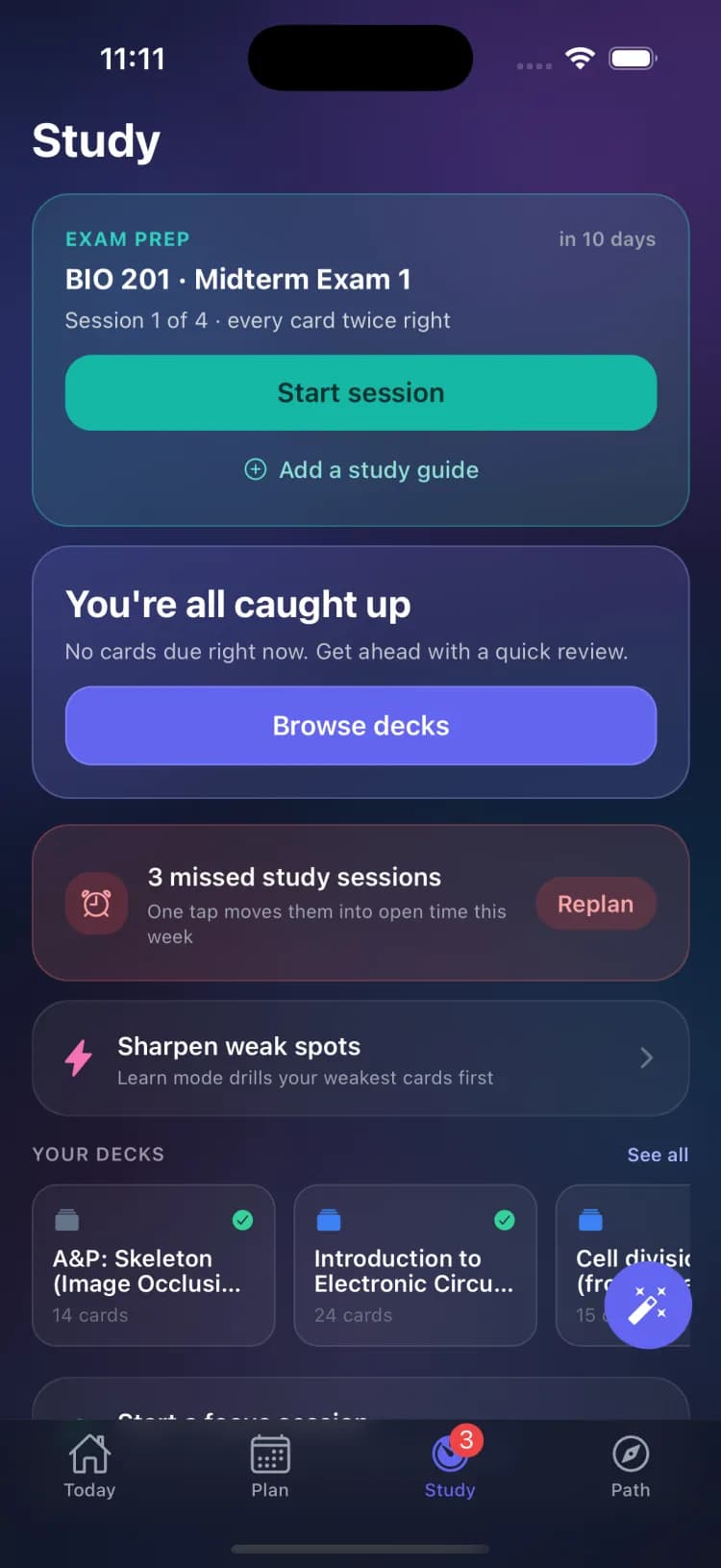
When an exam is on your Plan, an exam card appears on the Study tab and changes as the day approaches: from "Plan your prep now" weeks out, through "This week matters most," to "Exam day. Breathe. You put in the work."
Plan and run your prep
- 1Tap Plan my exam prep on the exam card. PlanexAI schedules short spaced sessions between now and the exam.
- 2Each day, tap Start session. Cards flip and grade like a normal review.
- 3Every card needs two Good (or better) ratings to retire from the session; missed cards requeue a few positions back until they stick.
- 4Finish the final session and the celebration says it plainly: "You are ready."
Add a study guide
Tap Add a study guide on the exam card to make the prep specific to what the professor shared. Scan or take a photo of a handout, Upload a PDF or image, or Paste text; PlanexAI reads it and builds targeted cards into your next session. The exam’s description (topics, chapters, units) feeds the plan too.
Frequently asked questions
When should I start exam prep?
Two weeks out is the sweet spot, and the exam card nudges you then. Starting later still works: the plan compresses into the days remaining.
Why do cards keep coming back in an exam session?
Exam sessions use successive relearning: each card must be rated Good or Easy twice to retire. It is the difference between recognizing an answer and reliably producing it under exam pressure.