
Get to know the mobile app
The four tabs, the focus bar, and where to find your profile: a two minute orientation to the PlanexAI iPhone app.
PlanexAI has four tabs along the bottom. Each answers one question.
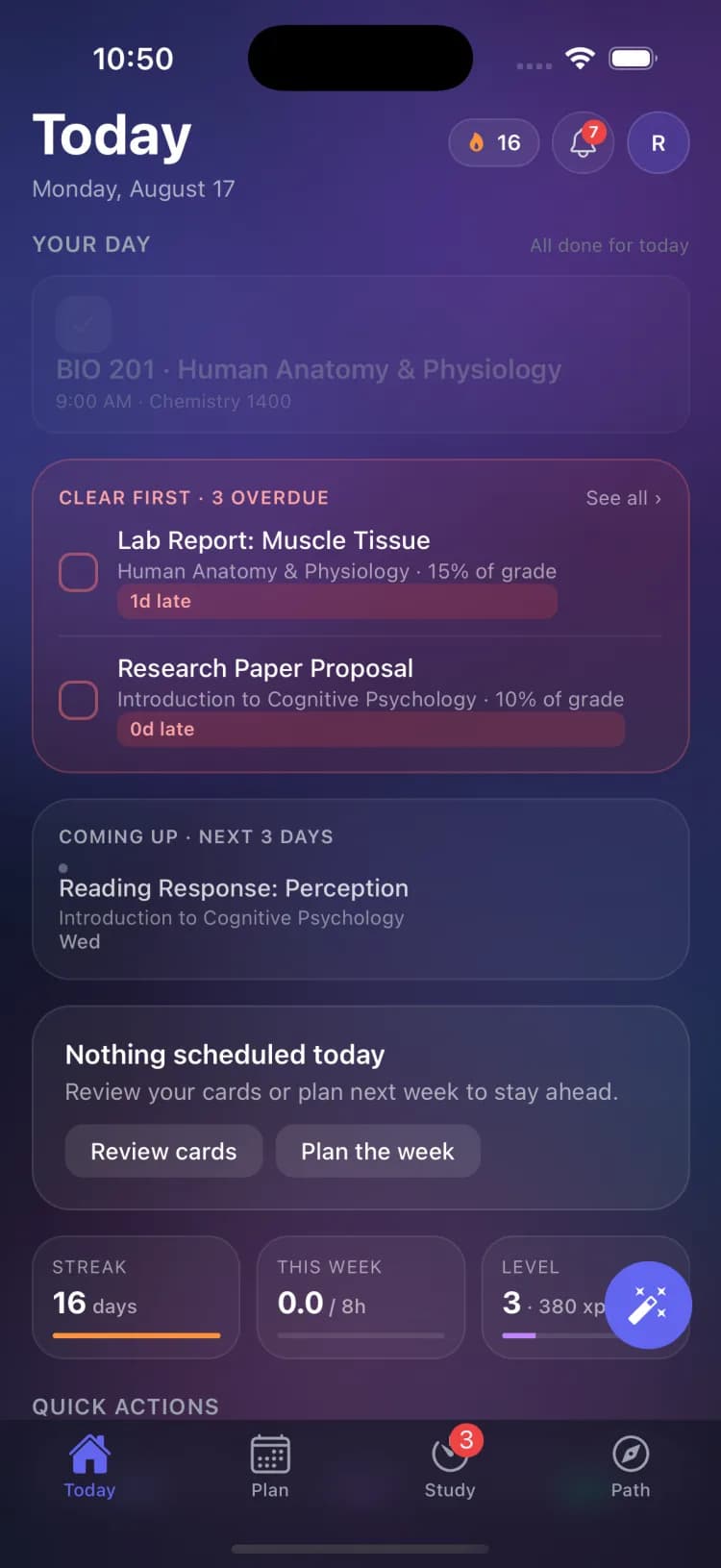
Today
What should I do right now? Overdue work first, then what is due today, tonight’s study plan, and your streak and level. The quick actions at the bottom jump straight to scanning a syllabus, capturing a note, or your SmartCards.
Plan
Your whole semester: calendar (week, month, and term views), courses, and assignments. The + button adds anything: scan a syllabus, a new assignment, an exam, a course, or an event.
Study
SmartCards review, quizzes, exam prep, notes, and the focus timer. When an exam is coming up, an exam card appears here with a prep plan.
Path
The bigger picture: career matches based on your coursework, the discovery quiz, readiness checklists, and your academic records.
Two things that follow you around
The round wand button opens Ask PlanexAI, where you can type or speak commands like "move my essay to Friday". And when a focus session is running, a focus bar appears above the tabs on every screen with your timer.
Your profile and settings live behind your avatar in the top right corner of the Today tab.
Related guides
Create your PlanexAI account
Sign up with your email or Apple account on the mobile app or at planexai.com. One account works everywhere.
Scan a syllabus with your phone
Point your camera at a syllabus or upload the file, and PlanexAI builds the whole course: every assignment, every due date.
Get to know the web dashboard
A quick orientation to the planexai.com dashboard: the sidebar, the Today page, and the built-in page tours.